If your older Tesla feels like it’s driving with a bit more hesitation than the brand-new models at the local Supercharger, you aren’t imagining things. The divide inside the Tesla fleet has officially grown from a minor software delay into a permanent hardware split.
Following Elon Musk’s official confirmation during the Q1 2026 earnings call, vehicles equipped with Hardware 3 (HW3) will not be able to achieve true Unsupervised Full Self-Driving without a hardware intervention. This comprehensive breakdown handles the hard technical details, real-world driving data, and upgrade pathways—unpacking the core Tesla HW3 vs HW4 FSD differences so you can protect your investment.
1. The Silicon Bottleneck: Processing Power vs. Memory Bandwidth
For years, the company maintained that the older processor suite introduced in 2019 was fully capable of complete autonomy. However, the sheer size of newer neural networks has pushed that silicon to its physical limits.
When you zoom in on the physical Tesla HW3 vs HW4 FSD differences, the bottleneck quickly reveals itself as a matter of memory bandwidth rather than raw processing speed alone.
While the original custom chip design was revolutionary for its era, running modern multi-billion-parameter artificial intelligence models requires massive data throughput.
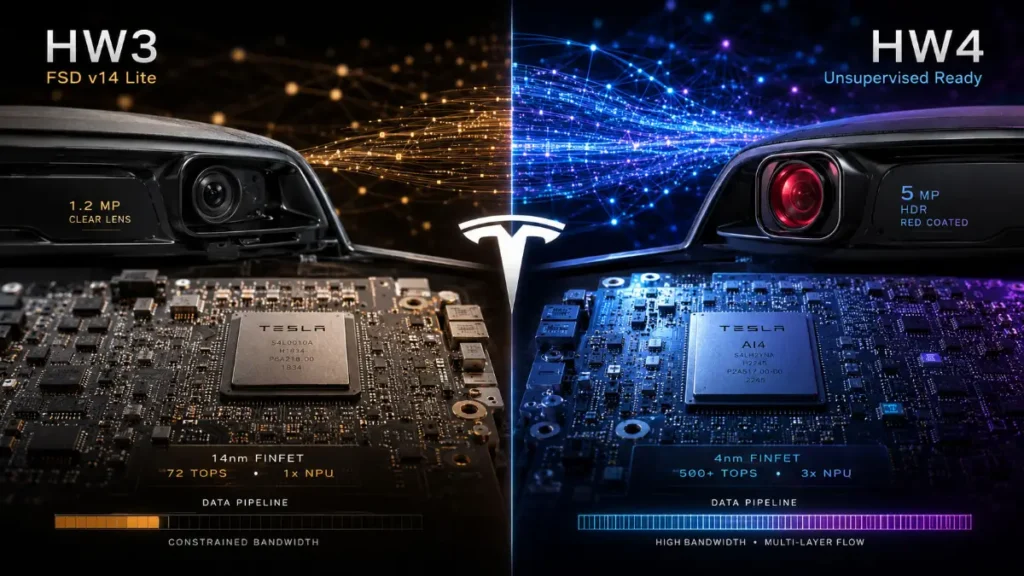
- Hardware 3 (HW3): Maxes out at roughly 144 TOPS (Trillion Operations Per Second) using dual redundant chips. Crucially, its memory configuration struggles to feed data fast enough to prevent modern dense neural networks from experiencing latency spikes.
- Hardware 4 (AI4): Bumps total compute capability significantly—offering roughly 3 to 5 times more effective processing throughput. More importantly, it doubles memory bandwidth, enabling it to run massive, uncompressed vision models without breaking a sweat.
To handle this delta, the engineering team has split the software branch. Vehicles running the newer computing platforms receive the full FSD v14 stack, whereas older vehicles are transitioned to an optimized, stripped-down branch called v14 Lite.
2. Sensor Disparity: 1.2MP vs. 5MP Clear Sight
A computer is only as good as its data inputs. The visual sensor array shows some of the most striking Tesla HW3 vs HW4 FSD differences out on the road, particularly in low-visibility environments.
As seen in physical hardware comparisons, the physical camera lenses are entirely distinct:
- The Resolution Leap: HW3 relies on an array of 1.2-megapixel cameras that capture images at roughly 1280×960 resolution. HW4 upgrades all primary lenses to 5-megapixel sensors. This extra resolution gives the vehicle the capacity to spot distant road hazards, small debris, and fast-moving traffic much earlier.
- Low-Light Capabilities: If you look closely at an HW4-equipped vehicle’s side repeater, you’ll spot a distinctive red-tinted lens coating. These updated optics are designed for high dynamic range (HDR) performance, preventing the blinding glare of oncoming high-beams and maximizing vision inside dark tunnels or down unlit country roads.
3. Real-World Capability Disparities
Where the actual driving experience exposes distinct Tesla HW3 vs HW4 FSD differences is during tricky maneuverability and complex parking lot navigation. The older computing platform simply lacks the capacity to process certain spatial tasks simultaneously.
- Starting From Park: HW4 platforms allow you to engage the automated driving system the moment you start the vehicle, straight from a parked position. HW3 requires you to manually pull out onto a clearly marked road before the system becomes available.
- Operating in Reverse: HW4 natively handles reverse gear maneuvers, allowing the car to back out of driveways, execute tight multi-point turns, and navigate complex dead-ends. HW3 lacks the spatial model memory to drive safely in reverse, often forcing immediate driver disengagement.
- Destination Parking: Real-world testing reveals that while newer cars reliably execute end-to-end trips—navigating down a driveway, hitting the highway, and safely pulling into a specific perpendicular parking space or charging stall at the destination—older models require hands-on intervention the moment you enter a parking area.
Interactive FSD Status Matrix
Understanding these Tesla HW3 vs HW4 FSD differences is crucial before putting down cash for a subscription or looking over the used vehicle market. Use the matrix tool below to calculate exactly where your vehicle sits on the autonomy roadmap.
FSD Compatibility Checker
Analyze your hardware configuration to see if your car supports Unsupervised FSD.
The Official Tesla Remedy Pathways
If your car is on the older side of the ledger, you aren’t completely out of luck. Tesla has organized clear avenues forward to address the situation:
- The FSD v14 Lite Branch: For owners who didn’t buy the software suite upfront or prefer not to mess with hardware updates, the dedicated “Lite” software branch continues to receive core updates, improved tracking behaviors, and safety patches. It remains an incredibly capable Level 2 driver assist, even if it won’t cross the threshold into unsupervised operation.
- Dedicated Metro Retrofit Facilities: For early adopters who paid full price for the Full Self-Driving suite on an older vehicle, Tesla is establishing specialized, production-line style upgrade centers in major metropolitan hubs. These centers are designed to swap out older onboard computers and camera sets to bring the vehicle up to modern capability standards.
- Owner Loyalty Trade-In Incentives: If you prefer to avoid hardware retrofits entirely, Tesla has periodically opened up official avenues allowing you to transfer your existing FSD software package directly over to a brand-new vehicle configuration at zero additional cost, frequently bundled with optimized trade-in valuations on your older model.
While software trickery can bridge minor gaps, the fundamental Tesla HW3 vs HW4 FSD differences mean total unsupervised autonomy belongs to the newer suites. If you are shopping for a used vehicle today, checking the fender camera housings and verifying the processor tier is the single most important step you can take.